

Practical guide to branching: Start with one of these battle-tested workflows
/Changelog

Changelog

The latest product updates from Neon

RSS feed

More projects on the Free plan

We've increased the Free plan project limit again! The Neon Free plan now includes:

  • 30 projects
  • 50 projects

This gives you even more room for side projects, prototypes, experiments, and learning new stacks.
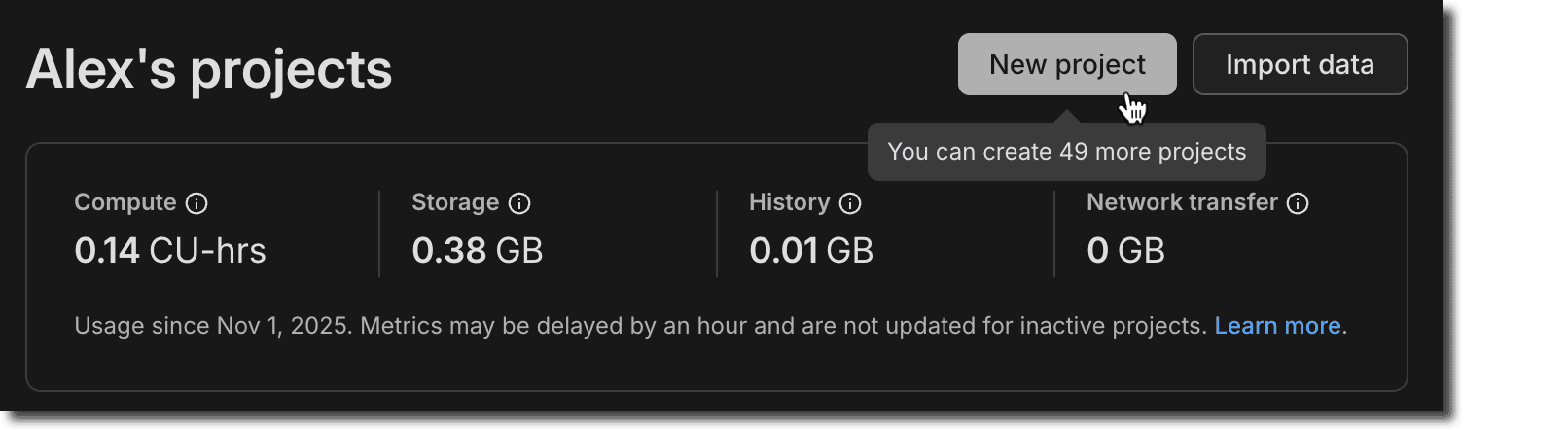
Dashboard page showing 50 Free Plan projects

This change applies automatically to all Free plan users. No action required. For more information about plan limits, see Neon plans.

Branch anonymization APIs

Last week, we announced Data masking for creating anonymized branches (see the November 14 changelog). This week, you'll find the APIs for this feature available in the Neon API reference.

Example request:

curl -X POST \
  'https://console.neon.tech/api/v2/projects/{project_id}/branch_anonymized' \
  -H 'Authorization: Bearer $NEON_API_KEY' \
  -H 'Accept: application/json' \
  -H 'Content-Type: application/json' \
  -d '{
    "masking_rules": [
      {
        "database_name": "neondb",
        "schema_name": "public",
        "table_name": "users",
        "column_name": "email",
        "masking_function": "anon.dummy_free_email()"
      },
      {
        "database_name": "neondb",
        "schema_name": "public",
        "table_name": "users",
        "column_name": "age",
        "masking_function": "anon.random_int_between(25,65)"
      }
    ],
    "start_anonymization": true
  }'

The new APIs include:

For usage examples and request/response details, see Data anonymization APIs.

Neon status page migration

We've migrated neonstatus.com to a new provider. The domain remains the same and all historical incident data has been preserved.

If you've previously subscribed to the Neon Status page via RSS, you'll need to update your feed. For instructions, see Neon status.

Fixes & improvements
  • Data masking page improvements

    • The Apply masking rules button on the Data masking page is now disabled when no masking rules have been changed, preventing unnecessary reapplication of masking rules.
    • Added placeholder text to the search field on the Data masking page to clarify that it searches for columns to anonymize.
  • API parameter deprecation

    • A redundant name query parameter in the Restore snapshot API endpoint has been deprecated. Use the name field in the request body instead.
  • Drizzle Studio update

    • The Drizzle Studio integration that powers the Tables page in the Neon Console has been updated to version 1.2.9. For the latest improvements and fixes, see the Neon Drizzle Studio Integration Changelog.
  • Fixes

    • The Restore branch from modal displayed before completing a restore operation now only shows an expiration date extension message for branches that have an expiration date set. Previously, the message was shown for all branches, even those without an expiration date.
    • Fixed an issue where timestamps shown on the Restore branch from modal were formatted inconsistently, alternating between UTC and local timezone. Timestamps now consistently display in your local timezone.
    • For the Neon Data API, we fixed an issue where PostgreSQL custom types (such as ENUMs) containing capital letters in their names were not handled correctly.
Data masking (Beta)

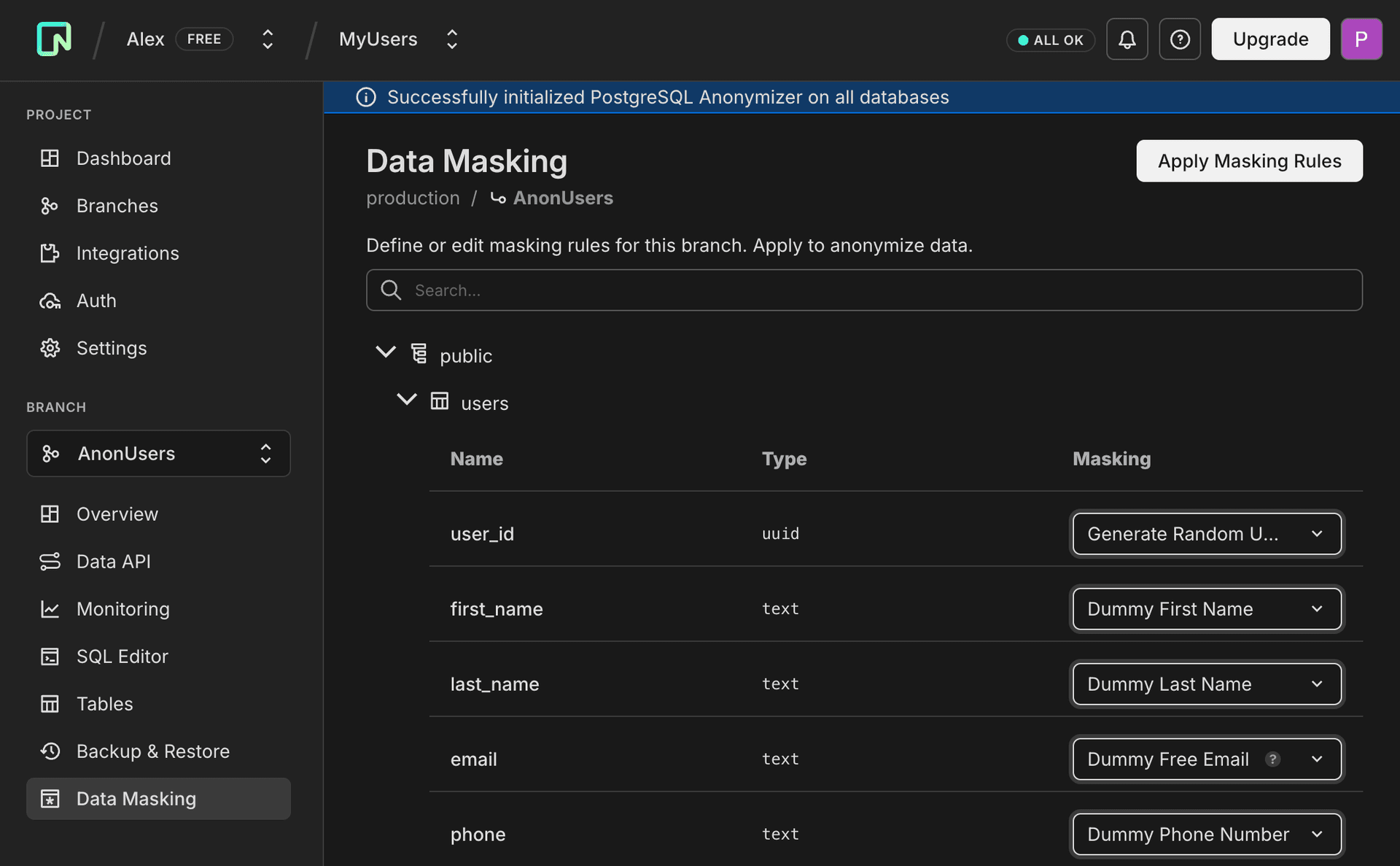
Neon now offers a data masking feature that makes it easy to create anonymized branches for development and testing. Define masking rules through the Neon Console or API to protect sensitive data like email addresses, names, phone numbers, and other personally identifiable information. Apply these rules to create a branch with production-like data that's safe to share with your team.

Neon Console data masking dialog with example masking functions configured

This feature uses the PostgreSQL Anonymizer extension (anon) under the hood.

For more information, see Data anonymization.

Branch auto-deletion enabled by default

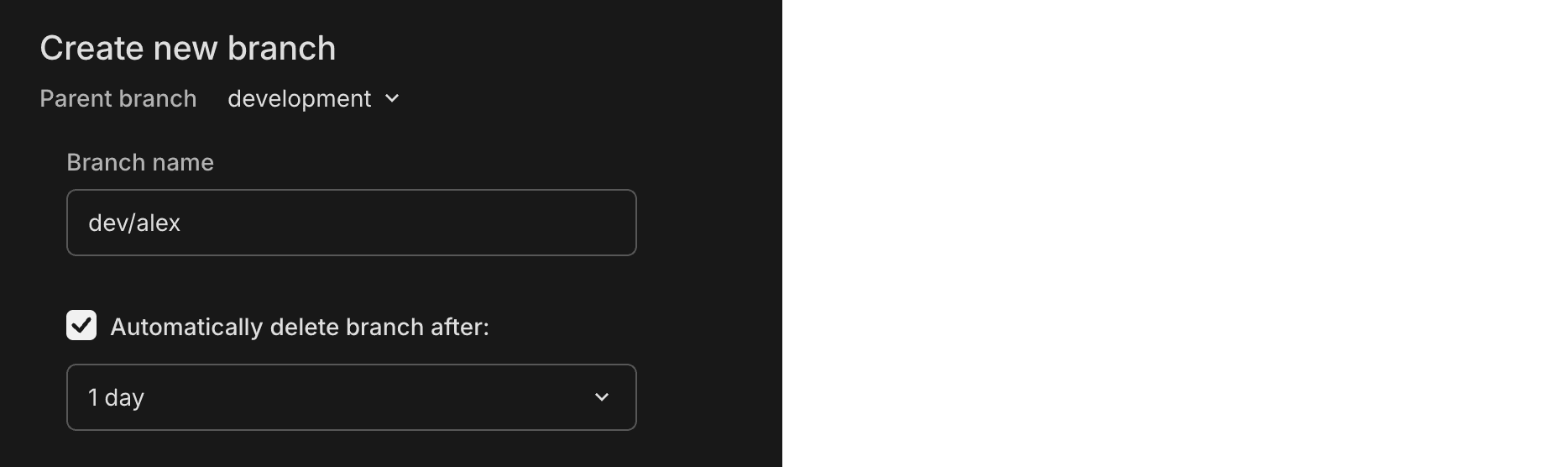
When creating a branch in the Neon Console, auto-delete is now enabled by default (set to 1 day). You can uncheck this option or adjust the timeframe as needed. This new default helps reduce storage costs and prevent the accumulation of unused branches.

Branch creation dialog with auto-delete enabled by default

Console only: This change only affects branches created through the Neon Console. Branches created via API or CLI are unaffected.

This change will be rolled out to all Console users in the coming days.

For more information, see Branch expiration.

More MCP Server tools

We've added several new capabilities to the Neon MCP Server:

  • Search across resources - You can now search across all your Neon resources with a single query. Ask your AI assistant:

    Can you search for "production" across my Neon resources?

    The assistant will search through organizations, projects, and branches, returning structured results with direct links to the Neon Console. Use the companion fetch tool to get detailed information about any resource.

  • Read-only mode - We've added read-only mode for safe operation in cloud and production environments. Enable it by adding the x-read-only: true header to your MCP configuration:

    {
      "mcpServers": {
        "Neon": {
          "url": "https://mcp.neon.tech/mcp",
          "headers": {
            "x-read-only": "true"
          }
        }
      }
    }

    When enabled, the server restricts all operations to read-only tools. Only list and describe tools are available, and SQL queries automatically run in read-only transactions, providing a safe method for querying and analyzing production databases without any risk of accidental modifications.

  • Guided onboarding - The new load_resource tool provides comprehensive getting-started guidance directly through your AI assistant. Ask "Get started with Neon" or "Help me set up my first project," and the assistant will load detailed instructions covering organization setup, project configuration, connection strings, schema creation, and migrations. This works in IDEs that don't fully support MCP resources and ensures onboarding guidance is explicitly loaded when you need it.

For more information, see Neon MCP Server.

WebSocket connection reliability improvements

WebSocket connections are now more stable during long-running queries and in edge runtime environments. The serverless proxy now prevents connection timeouts during idle periods, particularly benefiting applications with long-duration queries, analytics workloads, or deployments on edge runtimes like Vercel Edge Runtime.

Fixes & improvements
  • Neon Console:

    • The AI assistant and support options are now separated in the Resources menu for easier navigation, with support resources tailored to your plan.
    • The usage metrics panel on the Branch overview page now shows more accurate network transfer data for that branch.
    • Backup schedule improvements: schedule setup now provides clearer error messages to help you avoid invalid configurations, and the snapshot hour is now explicitly shown in UTC to eliminate timezone confusion. The Edit schedule button no longer appears for child branches since backup schedules can only be configured on root branches.
  • Drizzle Studio update

    The Drizzle Studio integration that powers the Tables page in the Neon Console has been updated to version 1.2.7. For the latest improvements and fixes, see the Neon Drizzle Studio Integration Changelog.

Reduced compute pricing across Launch, Scale, and Agent plans

We've reduced compute pricing by up to 25% across our plans:

  • Launch plan: Now $0.106 per CU-hour (previously $0.14)
  • Scale plan: Now $0.222 per CU-hour (previously $0.26)
  • Agent plan: Now $0.106 per CU-hour (previously $0.14)

These price reductions apply immediately to all usage going forward. No action is required—you'll automatically benefit from the new lower rates on your next billing cycle.

For detailed pricing information and usage examples, see Neon plans. To learn more about these price reductions, see our blog post.

More projects on the Free plan

We're pleased to announce that the Neon Free plan now includes:

  • 20 projects
  • 30 projects

This means more room for side projects, prototypes, experiments, and learning new stacks.

This change applies automatically to all Free plan users—no action required. For more information about plan limits, see Neon plans.

Connect your app to Neon with a single command

We've introduced a new command that configures the Neon MCP (Model Context Protocol) Server, giving your AI assistant full context about your Neon project—including connection details, schema, and best practices. Run this command in your app's root directory:

npx neonctl@latest init

The command walks you through an interactive setup:

npx neonctl@latest init
  Adding Neon to your project

  Authenticating.
┌────────┬──────────────────┬────────┬────────────────┐
 Login Email Name Projects Limit
├────────┼──────────────────┼────────┼────────────────┤
 alex alex@domain.com Alex 20
└────────┴──────────────────┴────────┴────────────────┘
  Authentication successful

  Installed Neon MCP server

  Success! Neon is now ready to use with Cursor.


  What's next? ────────────────────────────────────────────────────────────────────────────╮
│                                                                                           │
│  Restart Cursor and ask Cursor to "Get started with Neon using MCP Resource" in the chat  │
│                                                                                           │
├───────────────────────────────────────────────────────────────────────────────────────────╯

└  Have feedback? Email us at feedback@neon.tech

After setup, restart Cursor and ask your AI assistant to "Get started with Neon using MCP Resource" to launch an interactive 7-step onboarding guide. The guide analyzes your codebase and walks you through selecting or creating a project, configuring connection strings, installing dependencies (@neondatabase/serverless or pg), setting up an ORM like Prisma or Drizzle, and creating your database schema—all with contextual recommendations tailored to your environment.

This feature is currently in beta for Cursor, with VS Code and Claude Code support coming soon. For more details, see our blog post.

Backup schedule API (Beta)

You can now manage automated backup schedules via the Neon API. Previously, backup schedules could only be configured through the Console. With the new API endpoints, you can programmatically view and update backup schedules for your branches, enabling infrastructure-as-code workflows and automated backup management.

Available endpoints:

  • GET /projects/{project_id}/branches/{branch_id}/backup_schedule — View the current backup schedule for a branch
  • PUT /projects/{project_id}/branches/{branch_id}/backup_schedule — Update the backup schedule configuration

This makes it easier to standardize backup policies across projects and integrate backup scheduling into your deployment pipelines.

For more information, see Backup & restore.

Vercel integration now supports current Neon pricing plans

Vercel integration users now have full access to Neon's current usage-based pricing plans (Free, Launch, and Scale). Previously, Vercel integration users were limited to Neon's legacy plans. Free plan Vercel users have been automatically migrated to the new Neon Free plan. This change gives you access to all the latest features and pricing options, including:

  • Usage-based pricing with $5/month minimum on paid plans
  • Enhanced compute options and autoscaling
  • Advanced features like database branching for preview deployments
  • Flexible project and branch limits

To upgrade your plan, visit the Storage tab in your Vercel Dashboard, select your database, navigate to Settings > Update Configuration, click the integration settings link, and click Change Plan.

For more information, see Neon plans.

Fixes & improvements
  • Backup & restore
    • Fixed an issue where the source branch selector was empty on non-root branches, preventing point-in-time restore and preview data from working
    • Fixed snapshot list sorting on the Backup & Restore page: snapshots within each time group (Today, This week, This month) now show most recent first
    • Added a "Configure" link on the Backup & Restore page that takes you directly to the Storage settings page where you can adjust your PITR retention window
    • Changed default retention period for daily backup schedules from 1 to 14 days
  • Data API
    • The authenticated and anonymous roles created by the Data API are now granted to neondb_owner, allowing you to test RLS policies by switching roles (e.g., SET ROLE authenticated)
  • Vercel native integration
    • Added automatic cleanup of deployment records on the Deployments tab in Vercel when branches are deleted
Was this page helpful?

Subscribe to our changelog.
No spam, guaranteed.